Titans Author Studio · Launch pricing

Which kind of bookdo you want to create?

One studio is $75. Any two are $125. All three are $175.

One-time launch pricing in USD.

TITANS AUTHOR STUDIO · THREE SEPARATE PRODUCTS

Which kind of book
do you want to create?

Choose one writing & formatting tool for $75.
Choose any two for $125, or get all three for $175.

Planning more than one book type?Get all 3 for $175Save $50
TOOL 1SOLD SEPARATELY

Written Book
Studio

For high-content books: novels, nonfiction, memoirs & guides.

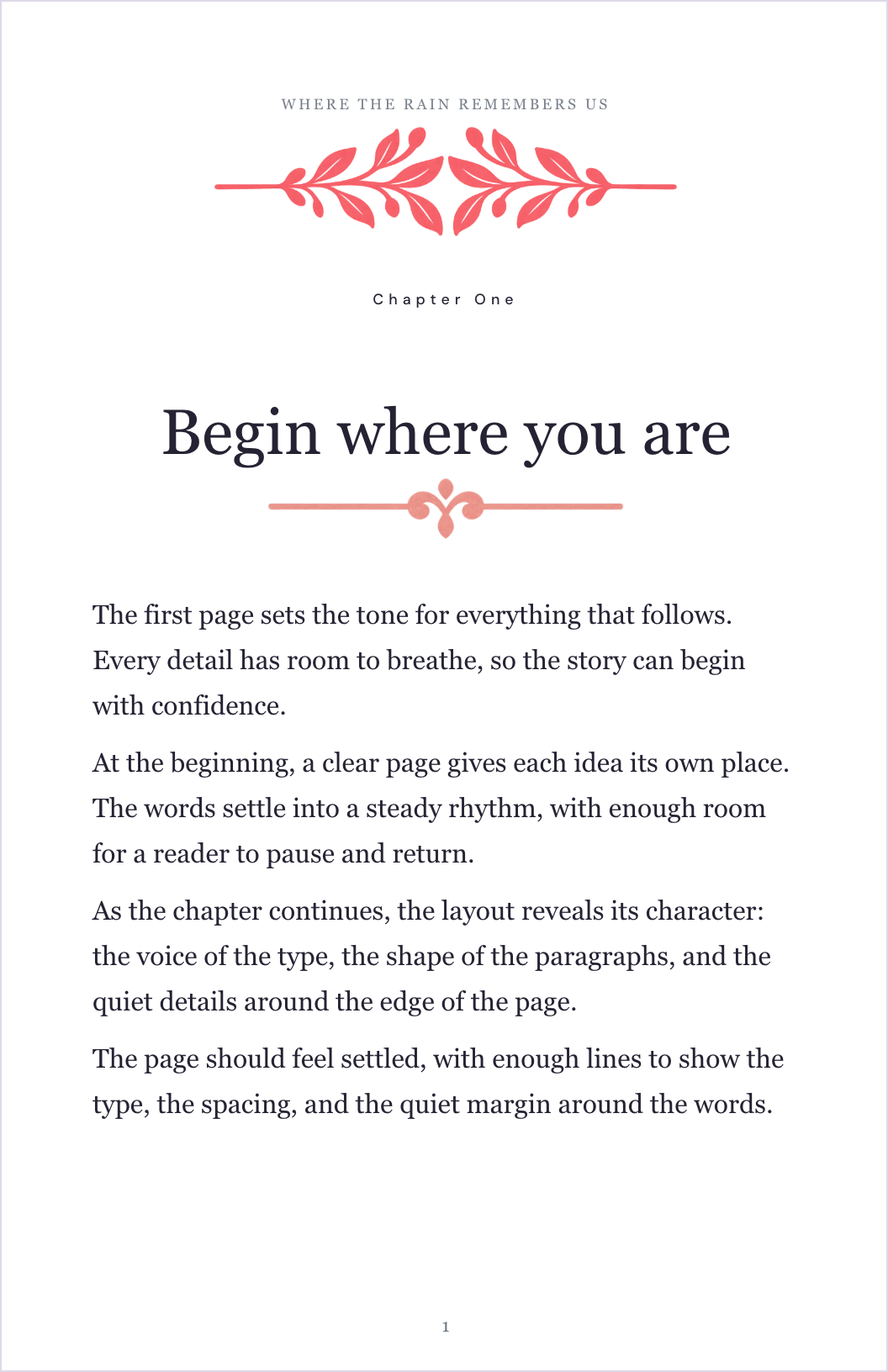
Fiction & Nonfiction Studio: manuscript with font and paragraph controls

Write chapters. Format your book.

  • Organize chapters and book sections
  • Choose fonts, headings, and spacing
  • Preview your formatted pages
After launch $149
$75one-time · USD
Save $74 at launch
See the Written Book toolQuick look below
TOOL 2SOLD SEPARATELY

Children’s Book
Studio

For picture books & illustrated stories.

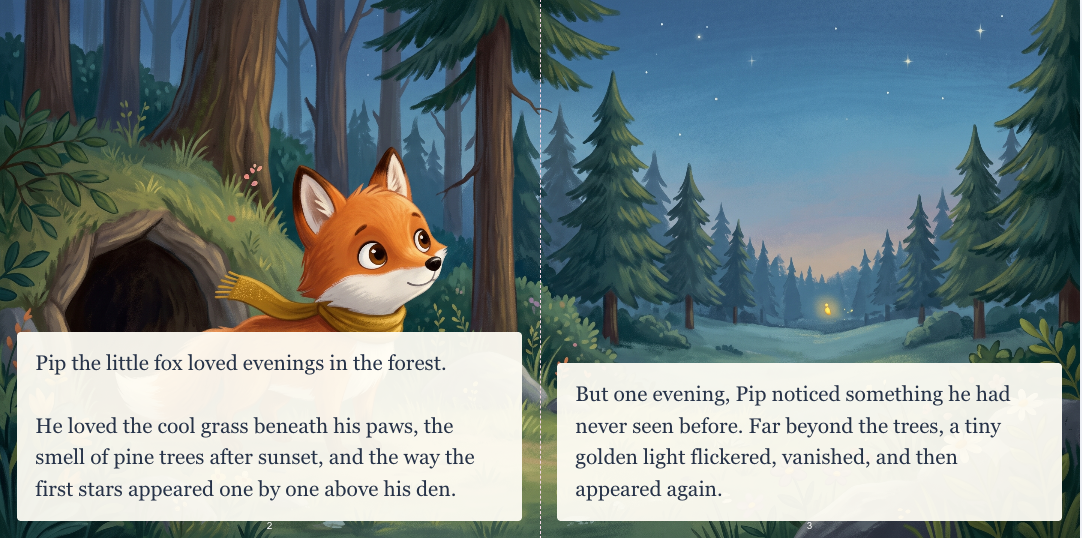
Children’s storybook sample: a fox and owl in a forest of fireflies
Pip took one small breath.
And then one small step.

Combine your story and artwork.

  • Design two pages together
  • Add your words and illustrations
  • Try different spread layouts
After launch $149
$75one-time · USD
Save $74 at launch
See the Children’s Book toolQuick look below
TOOL 3SOLD SEPARATELY

Cookbook
Studio

For recipe collections & family cookbooks.

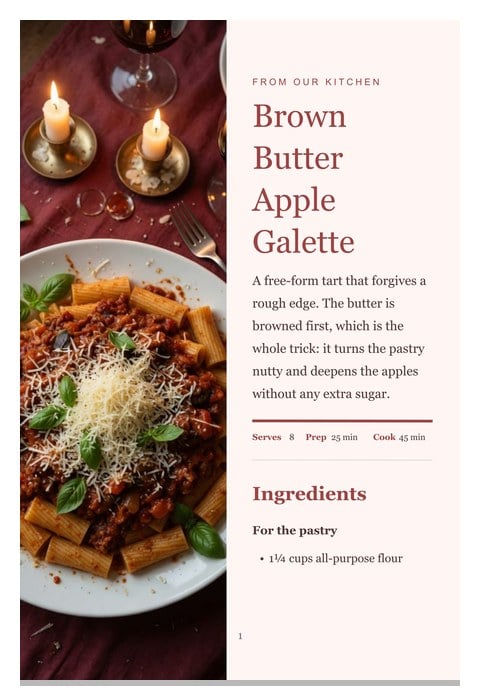
Cookbook sample: roasted tomato and basil soup
FROM YOUR KITCHENRoasted tomato
& basil soup
Ingredients · Instructions

Turn your recipes into book pages.

  • Add ingredients and instructions
  • Include timings, servings, and photos
  • Choose a ready-made recipe layout
After launch $149
$75one-time · USD
Save $74 at launch
See the Cookbook toolQuick look below
Three different tools. Buy only what you need.Each has its own writing workspace, formatting controls, and editable templates.
ONE BUNDLE · ALL THREE TOOLS

Can’t choose? You don’t have to.

Fiction & Nonfiction Studio + Children’s Book Studio + Cookbook Studio

After launch $299
$175 one-timeGet all 3 for $175$225 separately · Save $50
VIDEO DEMO · THREE SEPARATE TOOLS

See what you can create
with each studio.

Compare the three writing and formatting tools in the overview video. You can also explore each sample workspace yourself.

WHAT YOU CAN EXPLORE
01

Fiction & Nonfiction Studio

Write chapters, then style your manuscript.

02

Children’s Book Studio

Write your story, then arrange text and artwork in spreads.

03

Cookbook Studio

Enter recipes, then choose how the pages look.

No formatting experience?
Start with a template.

Each tool gives you a starting point for its type of book. Add your content, choose a style, and adjust it with visual controls.

1 Add your content2 Choose a template3 Customize & preview

You bring the words, recipes, and images. Review your finished pages before publishing.

SEPARATE TOOL · $75 ONE-TIME
TOOL 1 · FICTION & NONFICTION STUDIO

Write and format
chapter-based books.

Keep your manuscript organized and your attention on the words. Then give your book a consistent style without formatting every paragraph by hand.

  • Keep chapters, front matter, and back matter together.
  • Start with a genre-inspired template and make it yours.
  • Customize fonts, headings, spacing, and paragraph styles.
  • See formatted page previews as you work.
FictionNonfictionRomanceMemoirSci-fi & more
See everything this tool does
$75 one-timeGet all 3 for $175.Compare options
YOUR WORDS, BEAUTIFULLY ORGANIZED✦
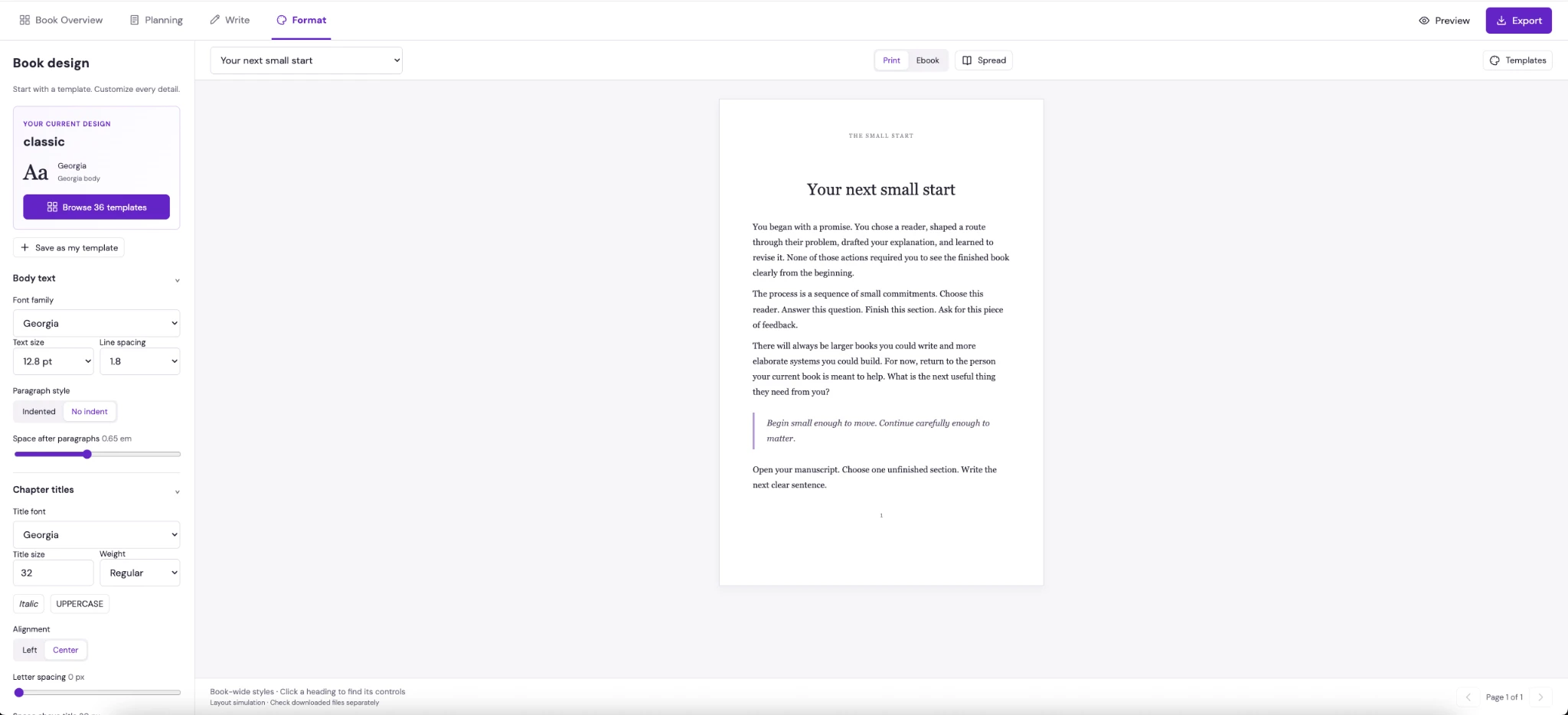
Actual formatting workspace showing whole-book font controls and a centered manuscript page
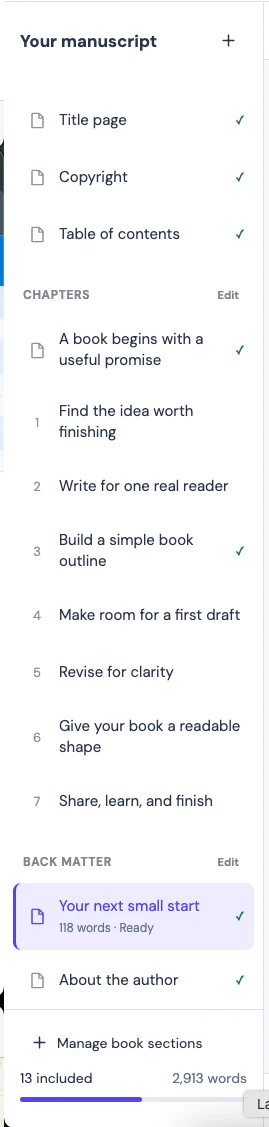
Manuscript sidebar listing chapters and book sections

A home for every chapter.

Add sections. Find your place. Keep moving.

Click screenshots to enlarge
FICTION & NONFICTION STUDIO

See the writing tool.
Then follow it through to export.

Write and organize your chapters

The writing workspace keeps your manuscript, chapters, and book sections together.

1 / 5Open the studio

Product screenshots of writing, formatting, templates, preview, and export.

Write and organize your chapters

The writing workspace keeps your manuscript, chapters, and book sections together.

SEPARATE TOOL · $75 ONE-TIME
TOOL 2 · CHILDREN’S BOOK STUDIO

Write and design
illustrated storybooks.

See the left page and right page together. Pair your words with your artwork and shape the rhythm of your story, page turn by page turn.

  • Create with a two-page spread in view.
  • Pair your own illustrations with editable text.
  • Try picture-led, text-led, and full-spread layouts.
  • Style one spread or build a consistent look across the book.
See everything this tool does
$75 one-timeGet all 3 for $175.Compare options
A LITTLE BRAVER · TWO-PAGE SPREAD
Illustrated fox and owl in an enchanted forest with glowing fireflies

Beyond the stream, a hundred fireflies lit up the trees. Pip had found a sky that grew between the branches.

The forest was still big. But Pip felt a little braver.

Panoramic artPicture + wordsStory bands

Example spread using the studio’s sample story and artwork.
CHILDREN’S BOOK STUDIO

See the storybook tool.
Then follow it through to export.

Write both pages of a spread

Tell the left page and the right page together, with your illustration underneath.

1 / 5Open the studio

Product screenshots of writing, formatting, templates, preview, and export.

Write both pages of a spread

Tell the left page and the right page together, with your illustration underneath.

SEPARATE TOOL · $75 ONE-TIME
TOOL 3 · COOKBOOK STUDIO

Write and format
your own cookbook.

Spend your energy on the food, not on lining up ingredients. Give every recipe a clear, inviting page that readers can follow.

  • Simple fields for ingredients and step-by-step instructions.
  • Keep servings, prep time, and cook time together.
  • Add food photography and your personal recipe notes.
  • Try different recipe layouts without starting over.
See everything this tool does
$75 one-timeGet all 3 for $175.Compare options
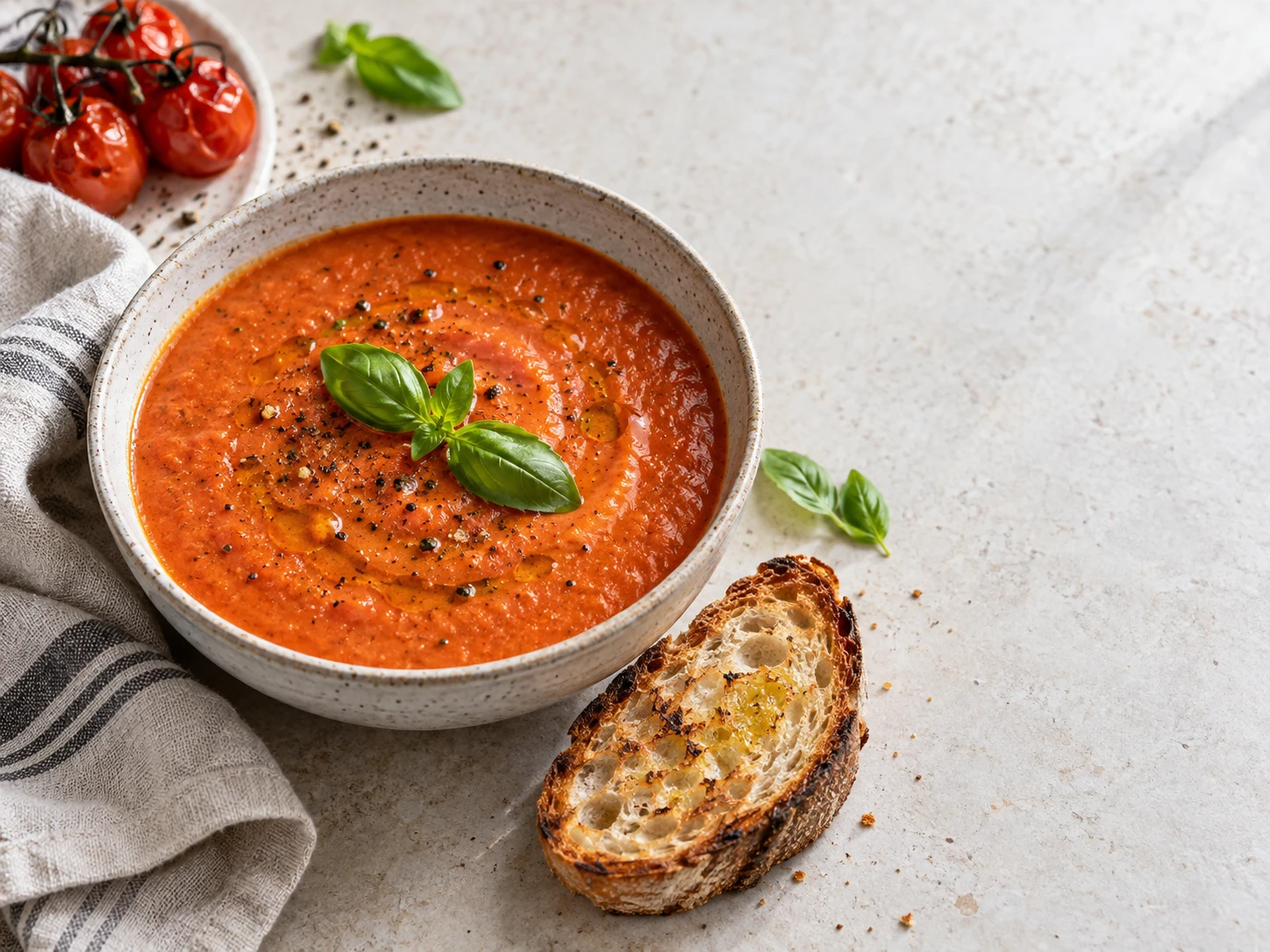
Roasted tomato and basil soup photographed for a recipe page
FROM OUR TABLE TO YOURS

Roasted tomato
& basil soup

SERVES 4   ·   PREP 10 MIN   ·   COOK 35 MIN

Ingredients

1 kg ripe tomatoes
1 onion, chopped
4 garlic cloves
2 tbsp olive oil
500 ml vegetable stock
Fresh basil

Let’s make it

1. Roast the tomatoes, onion, and garlic until soft and golden.

2. Simmer with stock. Blend, season, and finish with basil.

Good food.
Beautiful pages.
COOKBOOK STUDIO

See the cookbook tool.
Then follow it through to export.

Write the recipe in clear fields

Add the title, servings, ingredients, method, and notes.

1 / 5Open the studio

Product screenshots of writing, formatting, templates, preview, and export.

Write the recipe in clear fields

Add the title, servings, ingredients, method, and notes.

STILL NOT SURE WHICH ONE YOU NEED?

Match the tool to your book.

What you want to makeChoose this toolWhat it helps you do
A book made mostly of chapters and textFiction & Nonfiction StudioWrite and organize chapters, then style the manuscript.
An illustrated story with pictures and wordsChildren’s Book StudioArrange story text and artwork across two-page spreads.
A collection of recipesCookbook StudioTurn ingredients, instructions, and photos into recipe pages.
More than one of these book typesComplete bundleGet all three separate tools for $175.
EACH TOOL HAS ITS OWN

Writing workspace.
Formatting controls.
Editable templates.

Choose the tool designed for your book type. Every studio brings writing and page design together, with previews and built-in walkthroughs to help you get started.

One for $75 · Any two for $125 · All three for $175
BEFORE YOU CHOOSE

Choose the tools for the books you want to make.

Mostly chapters and text?

Choose Fiction & Nonfiction Studio for novels, memoirs, biographies, self-help, business books, and guides.

Illustrations tell the story?

Choose Children’s Book Studio for picture books where words and artwork share a two-page spread.

Recipes are the main content?

Choose Cookbook Studio for ingredients, instructions, timings, and food photography.

CHOOSE HOW YOU WANT TO CREATE

Start with one.
Save with a bundle.

One-time launch pricing in USD. Crossed-out prices show the planned prices after launch.

JUST WHAT YOU CAME FOR

Choose one studio

Choose the tool for the book you want to create.

After launch $149
$75one-time
Launch saving: $74
  • Your selected studio
  • Editable styles and layouts
  • Visual previews and built-in tours
Secure checkout
ADD ONE MORE STUDIO

Your two-tool bundle

Pick the combination that suits your next two books.

After launch $250
$125one-time
Launch saving: $125
  • Both studios you select
  • Save $25 versus $150 separately at launch
  • Only $50 more than one studio
Secure checkout
ALL THREE STUDIOS

All three studios

Every book type. More room for your next idea.

After launch $299
$175one-time
Launch saving: $124
  • Fiction & Nonfiction Studio
  • Children’s Book Studio
  • Cookbook Studio
  • Save $50 versus $225 separately at launch
Add the third studio for $50 more than two studios.
Secure checkout

One-time launch pricing in USD. Existing SPT customers: check your current bundle eligibility before purchasing.

CLEAR ANSWERS BEFORE YOU CHOOSE

Three tools.
No guesswork.

Is this one tool or three separate tools?

There are three separate writing and formatting tools: Fiction & Nonfiction Studio, Children’s Book Studio, and Cookbook Studio. They share the Titans Author Studio brand. You can buy one tool on its own or buy a bundle.

What does the $75 price include?

The $75 offer is for one tool of your choice. It does not include all three. Select the Written Book, Children’s Book, or Cookbook Studio.

What does the $175 bundle include?

The complete bundle includes all three tools: Fiction & Nonfiction Studio, Children’s Book Studio, and Cookbook Studio. Buying all three individually would cost $225. The bundle saves $50.

Can I choose any two studios?

The two-studio price is $125 at launch, with a planned post-launch price of $250. You can buy Fiction & Nonfiction with Children’s Book Studio, or Fiction & Nonfiction with Cookbook Studio. That saves $25 compared with buying two separately at the $75 launch price.

Does each tool handle both writing and formatting?

Yes. Each has a writing workspace and formatting controls suited to its book type. The written book tool focuses on chapters, the children’s tool on illustrated spreads, and the cookbook tool on recipe pages.

Which tool is best for a children’s chapter book?

If it is mostly continuous text organized into chapters, choose Fiction & Nonfiction Studio. For a picture book where illustrations and text share a two-page layout, choose Children’s Book Studio.

Do I need design skills or AI-generated content?

No. Start with an editable template and customize it with visual controls. Bring your own writing and images you have permission to use. You do not need AI to use the core tools.

Will these tools publish my book for me?

No. You still need to review your final files and upload them to your chosen publishing service. Final export formats and supported publishing specifications will be confirmed before purchase.

YOUR BOOK. YOUR CHOICE.

Pick your tool.
Or get all three.

Fiction & nonfiction · Children’s books · Cookbooks

YOUR STUDIO SELECTION

Complete Author Studio

$175 one-time · USD
After launch $299
Save $124 compared with the planned post-launch price

Want help with keywords or your cover?

Add an optional extra at a special price, or continue with just your studios.

Choose an optional add-on
Selected studios$175
No add-ons$0
Order total USD$175

One-time purchase. Payment happens on the secure checkout page.